Southwest pilots bid for vacation once a year. Seniority decides who gets what. Months of family planning ride on one bid — and the twenty-year-old tool was bad enough that many pilots were paying out of pocket for third-party apps instead.
Client
Southwest Airlines via Amdocs Studios
Timeline
2022 — Present
Role
Principal Designer
01 Problem
Miss your window, lose the week.
Southwest pilots bid for vacation once a year. Senior pilots pick first; everyone else works around them. Miss your window and you lose the week — which might be your kid’s graduation, or Christmas, or the only summer stretch your partner has off.
02 Constraint
SWAPA is the structure of the product.
Every design decision is governed by SWAPA — the Southwest Airlines Pilots Association contract. Pilots vote on it. Management negotiates it. The tool has to model it faithfully.
It defines bid windows, seniority, bid groups, and tiebreakers. Change any of it in the interface and you’re misrepresenting the contract to the people who voted for it.
03 Mental model
How pilots actually think about vacation.
The old tool asked pilots to rank weeks. That’s not how bidding works.
Under SWAPA, pilots bid in groups — two or three weeks the system tries to award together. Christmas and the Fourth. Christmas and any week in July. Any December week paired with any summer. Not a ranking. A strategy with contingencies.
The lower your seniority, the more strategy you need. Senior pilots submit a handful of bid groups. Pilots further down build thirty or more — starting specific, getting flexible, covering enough ground to land something they can live with.
04 Research
Four concepts. No winner.
Before designing, I needed to understand how pilots think about vacation — not how the contract describes it.
I partnered with a researcher on a RITE study. She facilitated; I synthesized findings and built the readout.
We tested four concepts:
A wizard that walked pilots through the flow step by step
An overview-first view that showed all options at once
A calendar-based visual model
A hybrid combining ranking with group selection
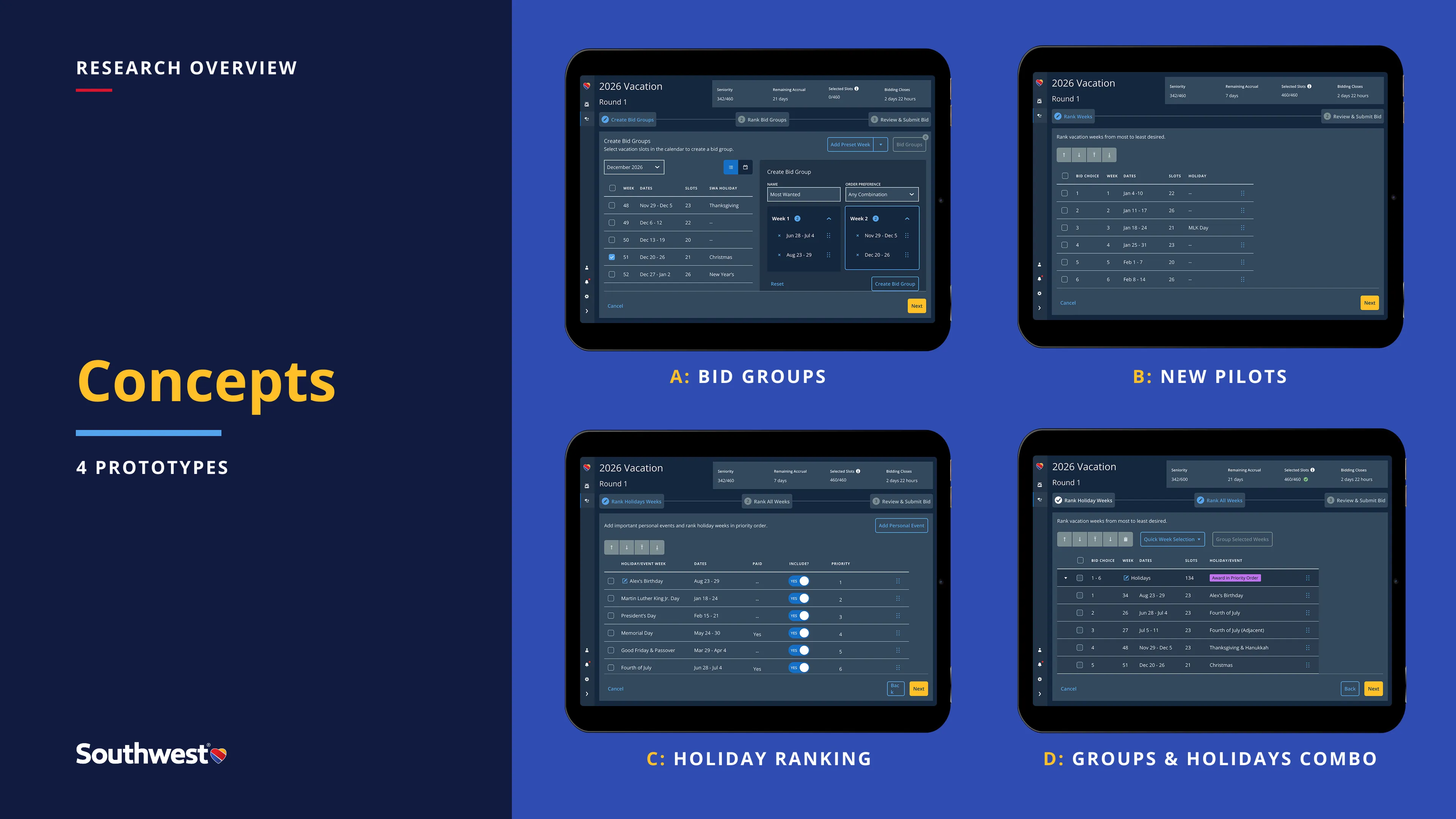
Four concepts tested in RITE sessions with pilots. No single approach won — each revealed something different about how pilots think about vacation strategy.
Each approach revealed a different mental model. No pilot wanted the same thing as the pilot before them. The wizard was reassuring for newer pilots and condescending for senior ones.
The more important finding was a terminology problem.
It’s not a term we use.
— Pilot, on *bid group*
“Bid group” is the contract’s word. Pilots don’t say it. They say Christmas week and the Fourth, or summer with my kids. The interaction was being designed in the wrong language.
I think for most people, holidays are important, but personal things are more important.
— Pilot, on what vacation is really about
Not about bidding logic. About why people take time off.
We synthesized the strongest elements and retested.
05 Design
Bid groups as strategy. Odds as information.
Bid groups, not ranked weeks
Pilots build combinations — primary, fallback, backup — the way they’d describe them out loud: Christmas and the Fourth. Christmas and any week in July. Any December week paired with any summer.
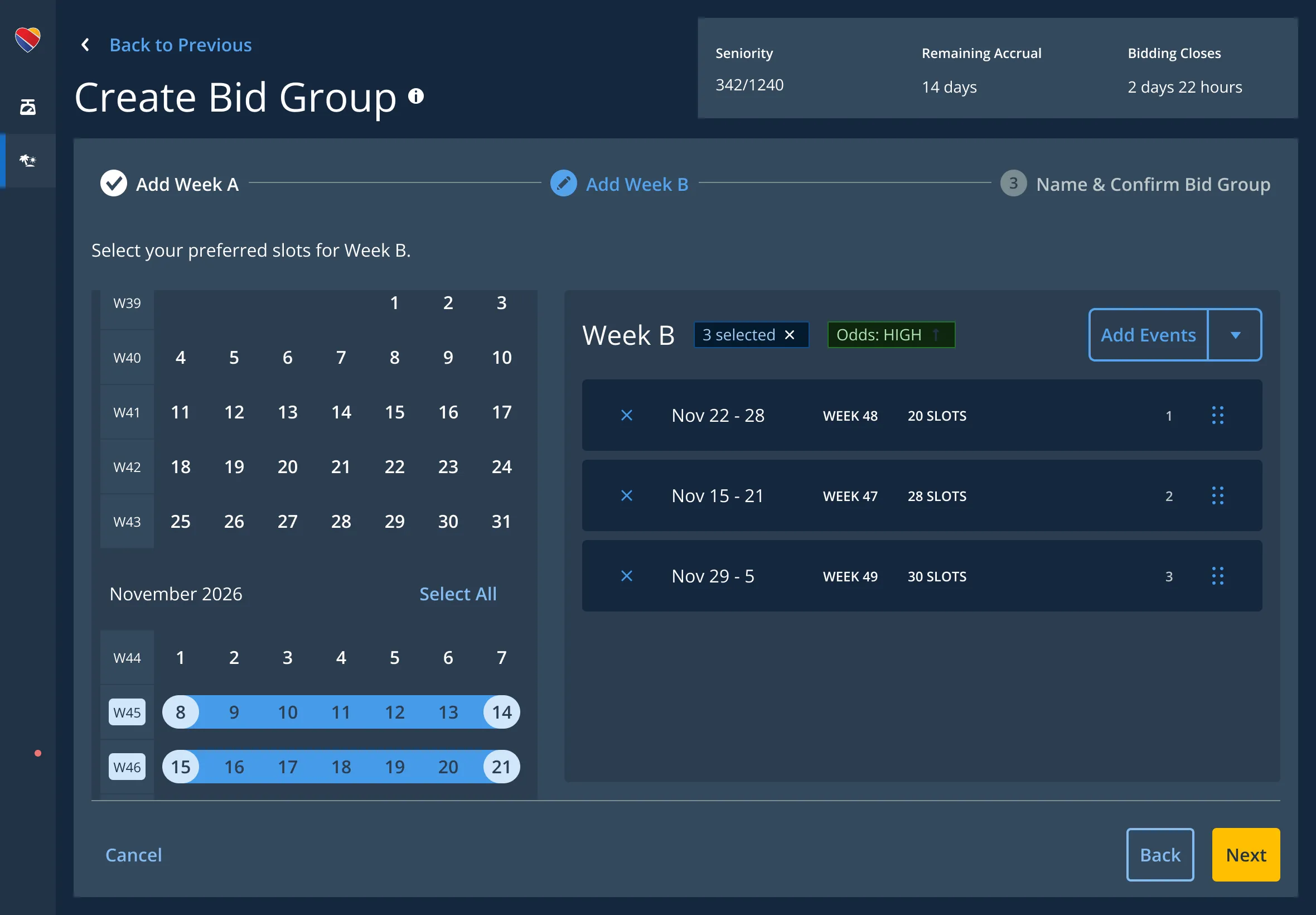
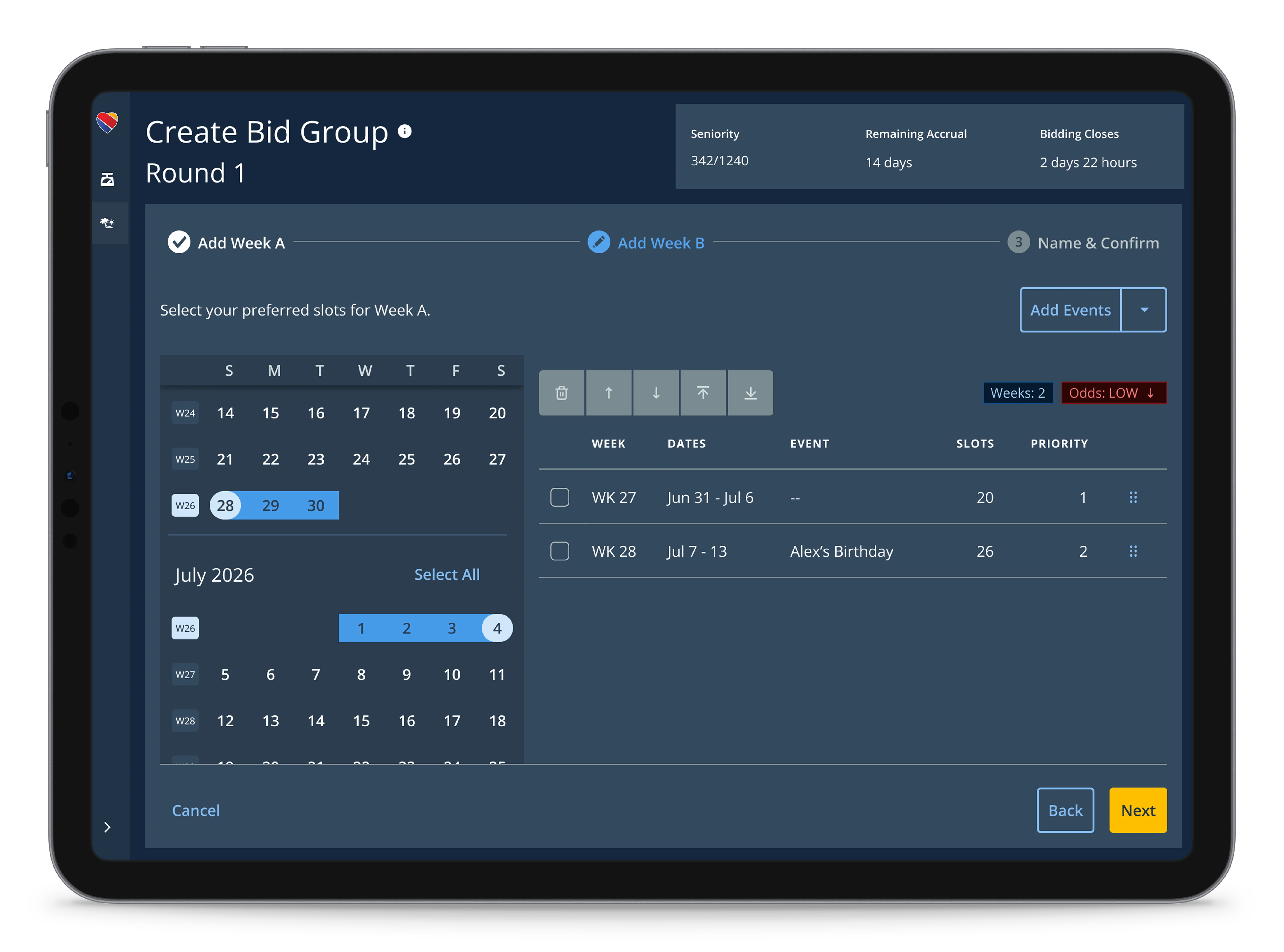
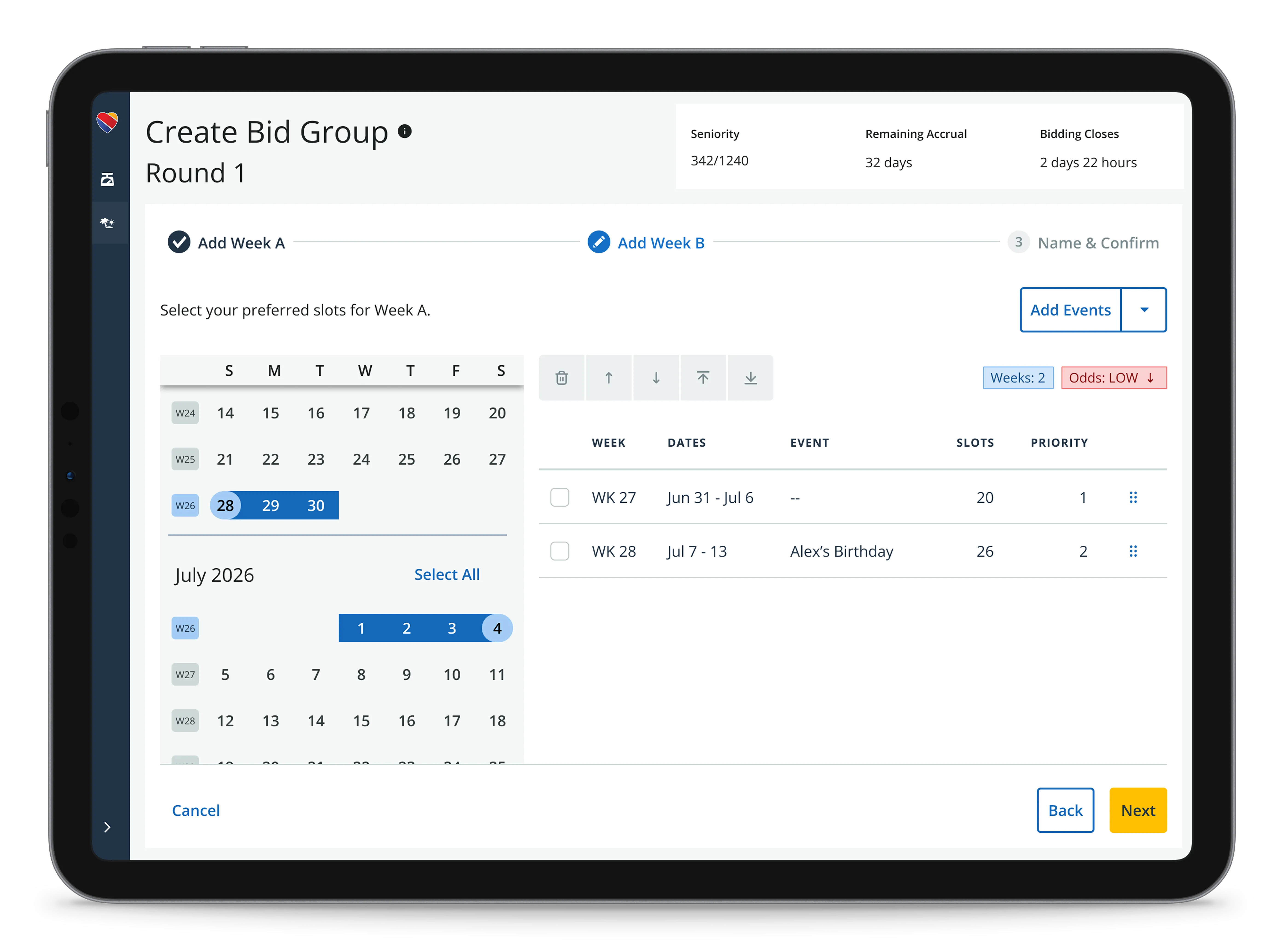
The interface mirrors that spoken logic. Pilots select weeks on a calendar, label the group, and submit it as a unit. As pilots build more groups, constraints loosen — each less specific than the last.
Step 2 of 3: Selecting weeks for the second slot of the bid group. The persistent context bar stays visible throughout — seniority, accrual remaining, bid close. Odds update in real time as pilots make selections.
Odds as information
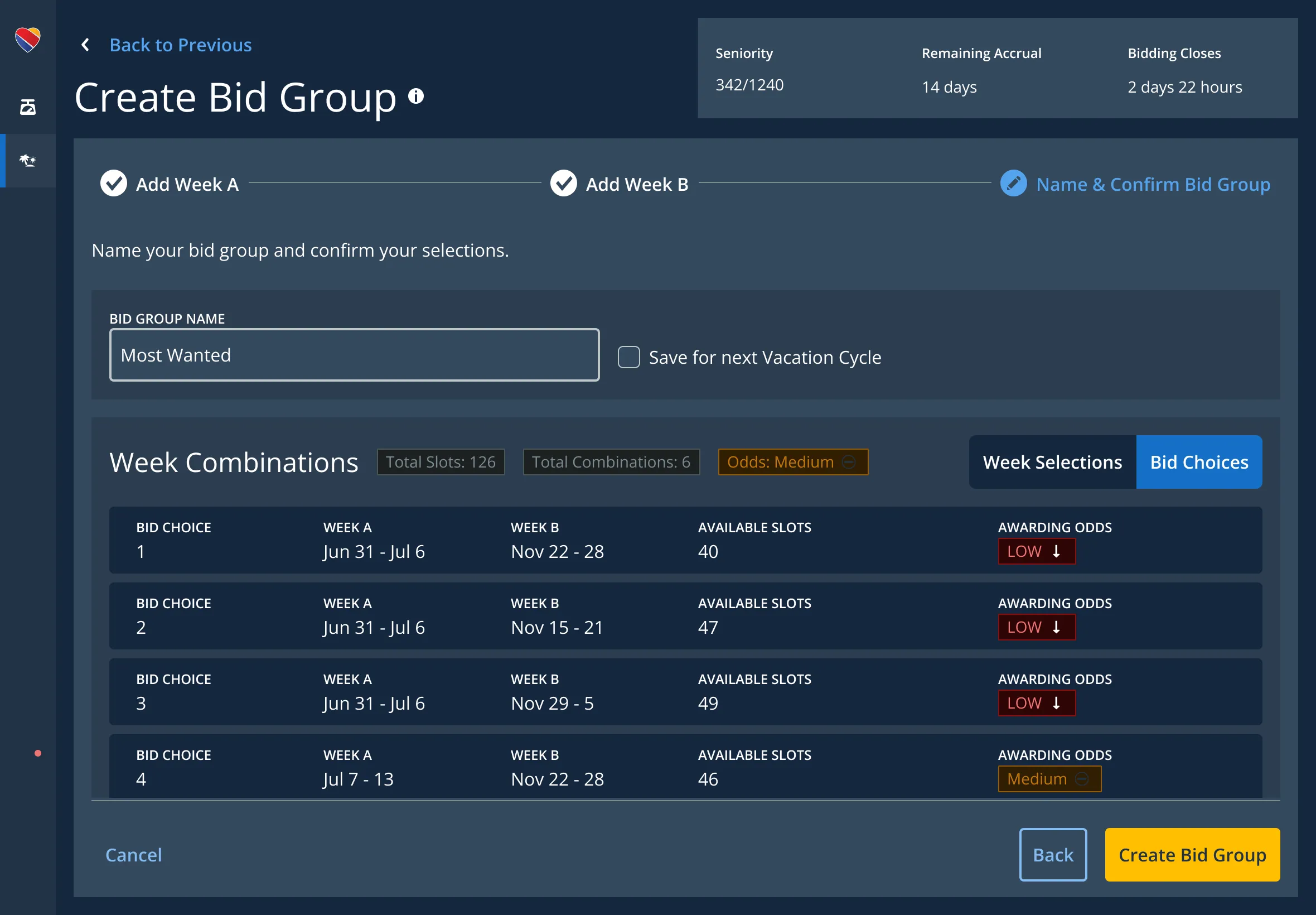
Every bid group shows a confidence level — High, Medium, or Low — based on the pilot’s seniority and the availability of the weeks they’ve chosen.
Odds aren’t a verdict. They’re a signal pilots can act on. A Low on your top group means you need more fallbacks. A High on a less-desirable group means you can relax about your backups and push harder on the primary.
The point is to make the math visible. Third-party apps couldn’t — they didn’t have the data. This one does.
Bid Choices view: all possible week combinations with awarding odds. Each combination scored against the pilot’s seniority and the current availability. The overall group odds show as a single badge at the top.
06 Status
Back to pilots — this time with a working prototype.
The second RITE study used a fully interactive prototype. I built it in Figma Make and Kiro, deployed through GitLab Pages. Pilots ran their actual strategy through the tool — Round 1 and Round 2 bid groups, real seniority, real weeks they wanted.
They liked it. Then they tried to break it. Edge cases the design wasn’t supposed to allow, contingencies that shouldn’t resolve, week combinations that should have failed validation. The system held. They moved on.
Video walkthrough
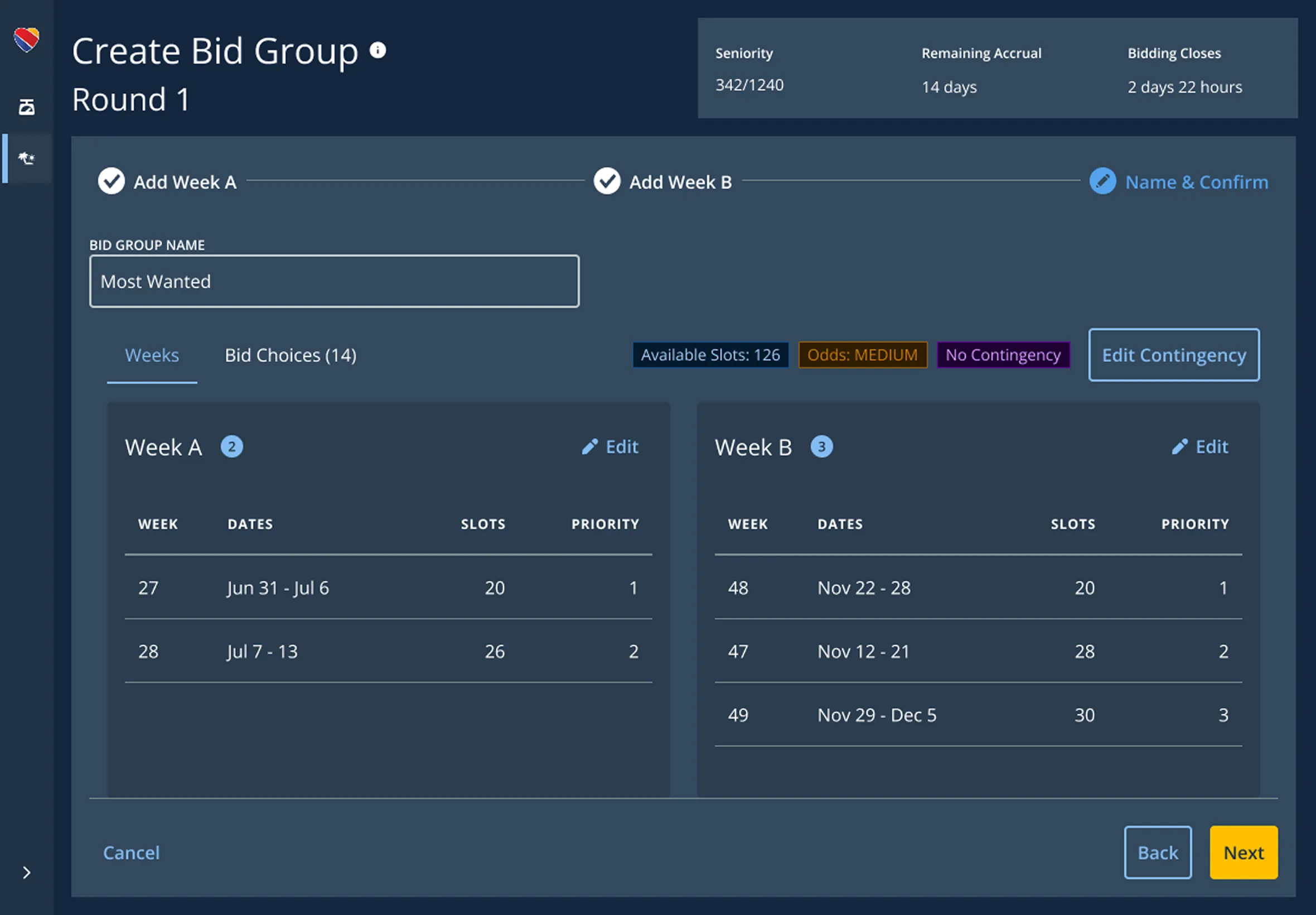
The pilot builds a three-slot bid group: Week A from a few weeks in April, then Week B and Week C each drawn from the full pool of January and February. On the Name & Confirm step, they review the resulting week combinations and bid choices, then edit a contingency so Week B and Week C can’t land consecutively. After reviewing the updated choices, they manually re-rank the bid — which breaks the grouped structure — and submit. The system confirms the bid was placed.
07 Team
What this is changing for the team.
The interactive prototype changed how we hand off to engineering — and gave the design team something to ship from.
Rethinking handoff
A working prototype answers questions specs can’t. Interaction timing, state logic, what happens when odds recalculate mid-flow. Engineering doesn’t interpret a document — they reference an artifact that’s already been through pilot hands.
We’re still figuring out what that means. But “the prototype is part of the handoff” is on the table now.
Final design tweaks. Even though updates are easy in Kiro, I found myself polishing designs in Figma before finalizing them in code.
A Kiro template for the team
I’ve built a Kiro template the rest of the design team can use without touching the CLI or wrestling with deployment. Wired into Jetstream, our design system, with about fifteen agent hooks — one-click start for a multi-page responsive prototype, browser preview, dependency install.
The point isn’t to turn designers into engineers. It’s to remove the thirty minutes of setup between “I have an idea” and “I can test it with someone.”
Kiro template, automatically connected to the design system. A designer triggers an agent hook and the prototype walks them through setting up an interactive page with multiple components, one question at a time. No coding, no CLI.
Video walkthrough
A designer triggers a Kiro agent hook from Jetstream. The agent walks them through building an interactive page one prompt at a time — picking a layout, adding components from the design system, configuring each one — without writing code or touching the CLI. The page is ready to preview in the browser when the conversation is done.